

Bluebook is College Board’s free official Digital SAT testing app, downloadable from bluebook.collegeboard.org on Windows, Mac, iPad, or a school-managed Chromebook. It is the only way to take the actual SAT and the only source of official full-length practice tests with the exact adaptive format, interface, and tools you will use on test day.
Every student taking the Digital SAT or PSAT must use Bluebook – there is no alternative testing platform. Whether you are downloading it for the first time to start practicing or setting it up the week before your official test date, this guide covers device requirements, the exact installation steps for every supported device, how to access official practice tests, and how to troubleshoot the most common setup issues.
What Is Bluebook and Why You Need It
Bluebook is the official College Board testing application used for the Digital SAT, PSAT/NMSQT, PSAT 10, and PSAT 8/9. It is completely free and serves two purposes: taking your actual official test on test day, and taking full-length official practice tests beforehand under realistic conditions.
Bluebook is not optional software for “extra practice” – it is the exclusive platform for the real exam. You cannot take the Digital SAT through any other application, website, or format. This makes early, correct installation genuinely important: technical problems on test day (outdated software, incompatible devices, low storage) can disrupt your testing experience in ways that have nothing to do with your academic preparation.
Device Requirements for 2026
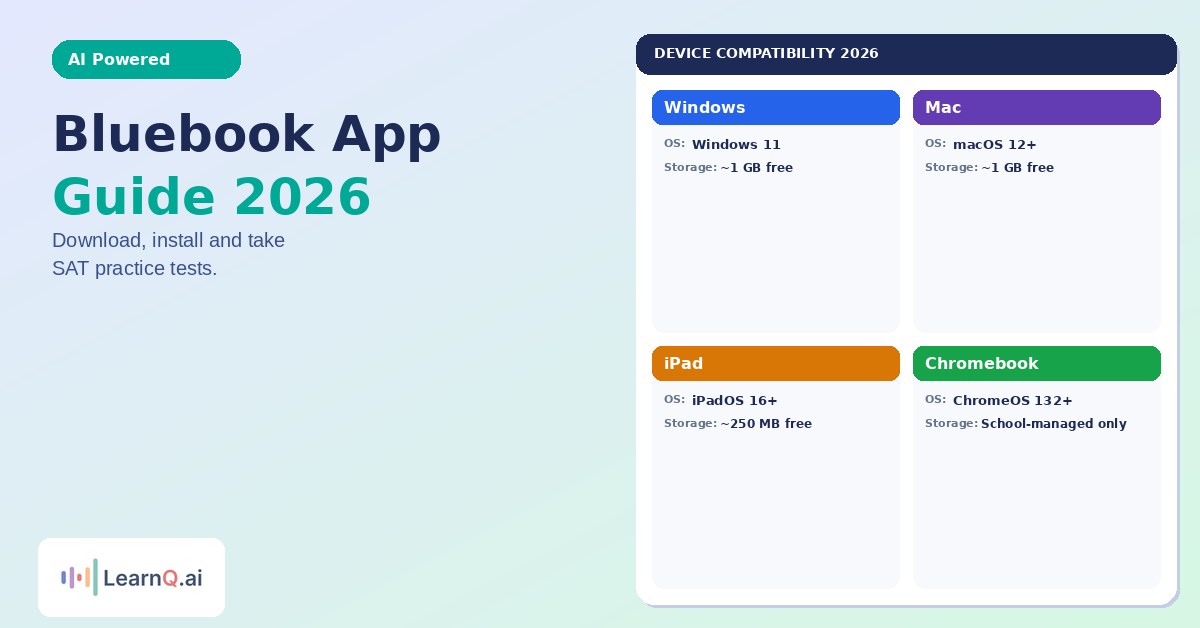
Bluebook runs on four device categories. Requirements differ by device, and some limits have changed for 2026 – notably, Windows 10 support ends in fall 2026.
| Device | OS Requirement | Storage Needed | Notes |
|---|---|---|---|
| Windows laptop/desktop | Windows 11 recommended | ~1 GB free | Windows 10 support ends fall 2026; S Mode and Windows 11 SE not supported |
| Mac | macOS 12 (Big Sur) or later | ~1 GB free | macOS 13+ needed for embedded text-to-speech; avoid updating macOS right before test day |
| iPad | iPadOS 16 or later | ~250 MB free | iPadOS 17-17.0.3 specifically not supported; external keyboard required for AP exams |
| School-managed Chromebook | ChromeOS 132 or later | ~1 GB free | Personal Chromebooks and ChromeOS Flex are not supported – only school-managed devices |
Devices that will not work: mobile phones, personal (non-school-managed) Chromebooks, and tablets without keyboard support where one is required. Your device also needs a stable Wi-Fi connection to check in and submit your test, though Bluebook can continue running offline temporarily if your connection drops mid-test – you simply need to reconnect before final submission.
Battery requirement: your device must hold a charge for 3-4 hours on test day. Bringing your charging cable or a portable charger is strongly recommended even if your battery seems sufficient.
How to Download and Install Bluebook
On Windows or Mac
- Go to the official Bluebook download page.
- The site auto-detects your operating system and provides the correct installer link.
- Download the installer file and run it.
- Follow the on-screen setup prompts to complete installation.
- Launch Bluebook and sign in using your College Board student account (create one first at collegeboard.org if you do not already have one).
- Accept the terms of use to reach the Bluebook home screen.
On iPad
- Open the App Store and search for “Bluebook Exams” by College Board.
- Download and install the app as you would any other App Store app.
- Launch Bluebook and sign in with your College Board account.
- If you plan to test with accommodations (extended time, screen reader, etc.), these can be enabled later in app settings once your accommodations are approved through your school.
On a School-Managed Chromebook
Personal Chromebooks cannot run Bluebook – only Chromebooks managed by your school’s IT system are supported. In most cases, you will not need to install Bluebook yourself; your school’s test coordinator or IT department installs it centrally before test day. If you are unsure whether your school Chromebook already has Bluebook, ask your teacher or test coordinator directly rather than attempting to install it independently.
After Installation: Verify Your Setup
Once installed, use Bluebook’s built-in “Test Your Device” feature to confirm your device meets all requirements before relying on it for test day. This check reviews your internet connection, storage space, and software compatibility in one step, catching problems early rather than on the morning of your test.
How to Take Practice Tests in Bluebook
Once Bluebook is installed and you are signed in, accessing practice tests is straightforward:
- On the Bluebook home screen, find the “Practice and Prepare” section.
- Choose between “Test Preview” and “Full-Length Practice”.
- Test Preview is untimed and shows you the test format, directions, question types, and in-app tools (annotation, flagging questions for review, answer eliminator) without any time pressure. This is worth completing before your first full-length practice test if you have never used Bluebook before.
- Full-Length Practice launches a complete, timed, adaptive practice test using the same interface, question difficulty, and scoring system as the real exam.
- Select the appropriate test type (Digital SAT, PSAT/NMSQT, PSAT 10, or PSAT 8/9) and the specific practice test assigned or available to you.
Currently available official practice tests: Practice Tests 4 through 10 are available as of 2025-2026 (Tests 1-3 were retired). These are full-length, official, adaptive tests built by College Board specifically to mirror the real exam’s format and difficulty distribution. See the Bluebook practice test accuracy guide for a breakdown of how these compare to the actual SAT and which to prioritise at different score levels.
One difference from the real exam: in practice tests, you can advance to the next module before your allotted time expires if you choose. On the actual SAT, you cannot move ahead early – each module runs its full designated time. Practicing at a realistic pace rather than rushing through early is important for building accurate pacing habits. See the SAT pacing strategy guide for section-by-section timing benchmarks.
Understanding Your Bluebook Practice Test Score
At the end of each full-length practice test, Bluebook generates a scorecard nearly identical to what you receive on your official SAT – a total score (400-1600), section scores for Reading and Writing and Math, and a breakdown by content domain.
This breakdown is the most valuable part of the practice test experience. Rather than fixating on the total score, review which specific question types (within R&W’s four domains and Math’s four domains) produced the most missed questions. This becomes the foundation for a targeted study plan rather than generic review.
Because Bluebook uses the same adaptive Multistage Testing (MST) structure as the real exam, your Module 1 performance in each section determines whether you route into a harder or easier Module 2. See the Module 1 strategy guide for exactly how this routing works and why early accuracy carries outsized strategic value on both the practice tests and the real exam.
Common Bluebook Setup Issues and Fixes
Auto-update failures: Bluebook periodically updates itself. If the app fails to update automatically, try closing and reopening it, or reinstalling from the official download page if the issue persists. Avoid updating your operating system (especially macOS) in the days immediately before your test date, since OS updates can sometimes introduce compatibility issues with the currently installed Bluebook version.
Insufficient storage: Bluebook needs roughly 1 GB of free space on Windows, Mac, and Chromebook devices, or 250 MB on iPad. If installation or updates fail, check your available storage first before assuming a software problem.
School-managed device restrictions: If you are testing at school and cannot download Bluebook yourself, this is expected behavior, not an error – school IT departments control installation on managed devices. Contact your test coordinator rather than attempting workarounds.
Wi-Fi connectivity concerns: You need an internet connection to check in at the start and submit at the end of a test session, but Bluebook is designed to continue functioning if your connection drops temporarily during the test itself. Reconnect before attempting to submit.
iPad external keyboard confusion: External keyboards are permitted (and required for AP exams) on iPad, but external keyboards are generally not permitted for laptop-based testing on Windows, Mac, or Chromebook devices, where only the built-in laptop keyboard is used.
Test-Day Checklist
Before your official test day, confirm the following using your Bluebook installation:
- Bluebook is installed and updated to the latest version on the exact device you will bring to testing
- Your device passes the “Test Your Device” check within the app
- Your device is fully charged and you have a charging cable or portable charger as backup
- You know your login credentials for your College Board account
- If testing with accommodations, these are enabled and confirmed in the app ahead of time
- You have completed at least one full-length practice test on this same device to confirm the setup works end-to-end
Using Bluebook Results to Build Your Prep Plan
A Bluebook practice test score is most valuable as a diagnostic input, not a final verdict. Once you have your domain-level breakdown, LearnQ.ai’s free diagnostic test can confirm and deepen that breakdown with additional targeted questions, giving you a clearer picture of exactly which sub-skills need work.
Mia, LearnQ’s AI tutor, can generate unlimited practice questions targeting your specific weak areas from your Bluebook results – useful since Bluebook itself offers a limited number of official full-length tests, and you will want additional targeted practice between attempts. For continued Math-specific practice organized by exact topic and difficulty, see the SAT Math practice hub. Take a free full-length practice test on LearnQ to supplement your official Bluebook attempts. See LearnQ’s full Digital SAT platform for a structured plan connecting your Bluebook diagnostic data to daily practice.
If you are a 10th or 11th grader using Bluebook for PSAT practice specifically, see the average PSAT score by grade guide for how your Bluebook PSAT results compare to grade-level benchmarks.
FAQ
Is Bluebook free to download?
Yes. Bluebook is completely free and available directly from College Board’s official download page. There is no cost to download the app, create a College Board account, or access practice tests through Bluebook.
What devices support Bluebook in 2026?
Bluebook runs on Windows (Windows 11 recommended; Windows 10 support ends fall 2026), Mac (macOS 12 or later), iPad (iPadOS 16 or later, excluding versions 17-17.0.3), and school-managed Chromebooks (ChromeOS 132 or later). Personal Chromebooks, mobile phones, and unsupported tablets cannot run Bluebook.
Can I take the SAT without Bluebook?
No. Bluebook is the exclusive platform for the Digital SAT, PSAT/NMSQT, PSAT 10, and PSAT 8/9. There is no alternative way to take these official tests – all administrations, whether at a test center or through a school day sitting, run through the Bluebook app.
How many official practice tests does Bluebook offer?
As of the 2025-2026 cycle, Practice Tests 4 through 10 are available in Bluebook (Practice Tests 1-3 were retired). Each is a full-length, official, adaptive test built to mirror the real exam’s format, difficulty, and scoring.
Do I need internet access to take a Bluebook practice test?
You need an internet connection to check in at the start of the test and to submit your results at the end. If your Wi-Fi drops during the test itself, Bluebook is designed to let you continue working offline temporarily – just make sure to reconnect before final submission.
Can I download Bluebook on a school Chromebook myself?
Usually not. School-managed Chromebooks typically have Bluebook installed centrally by the school’s IT department rather than by individual students. If you are unsure whether Bluebook is already installed on your school device, ask your teacher or test coordinator rather than attempting to install it yourself.
What should I do if Bluebook won’t update or install correctly?
First, check that your device has sufficient free storage (roughly 1 GB for Windows/Mac/Chromebook, 250 MB for iPad). Try closing and reopening the app, or reinstalling directly from the official download page. Avoid updating your device’s operating system in the days immediately before your test date, as this can occasionally cause compatibility issues with your installed Bluebook version.
Sources: College Board official Bluebook download and setup documentation (bluebook.collegeboard.org); College Board Bluebook full-length practice tests page (satsuite.collegeboard.org); ScholarshipsandGrants.us Digital SAT 2026 device requirements guide (scholarshipsandgrants.us, February 2026); PrepMaven Bluebook app complete guide (prepmaven.com, December 2025); EdisonOS Bluebook testing guide (edisonos.com, May 2026)

The LearnQ Editorial Team is made up of certified Digital SAT tutors, college admissions specialists, and AI education researchers. Our tutors have personally helped over 10,000 US high school students improve their SAT scores, with an average improvement of 150+ points. We combine hands-on tutoring expertise with AI-powered insights from the LearnQ platform, which has analyzed millions of Digital SAT practice questions. Every article we publish is reviewed against the latest College Board Bluebook guidelines and cross-checked with real student performance data. Our mission is simple: give every student the same quality of prep that was once only available at expensive tutoring centers.