

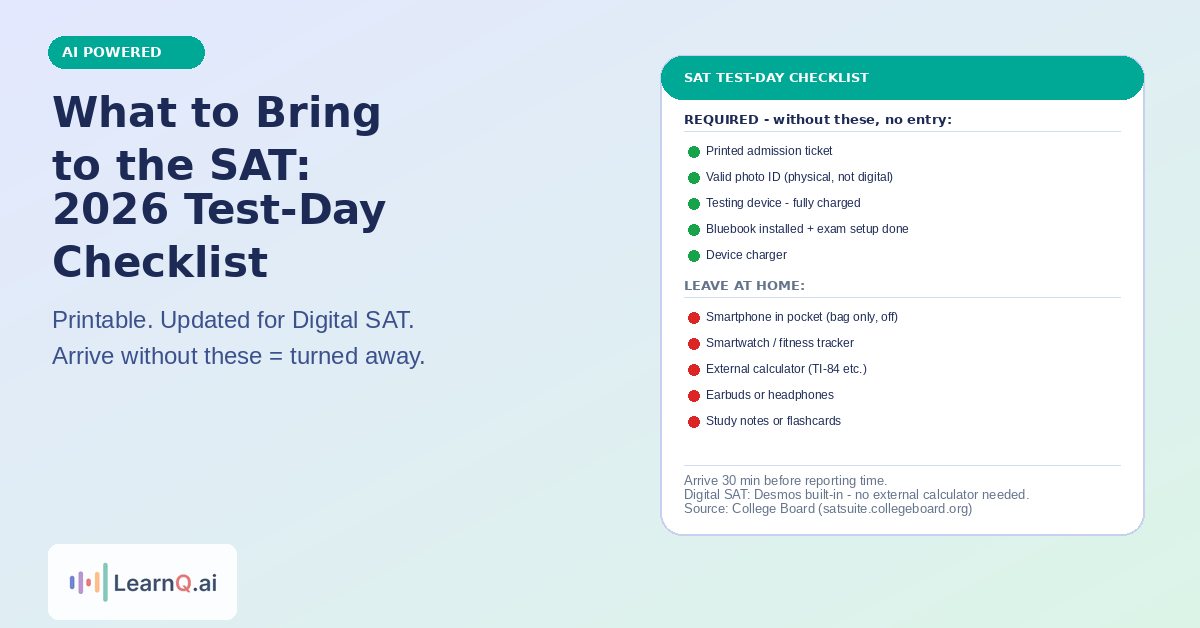
Bring your printed admission ticket, a valid photo ID, a fully charged testing device with Bluebook installed and exam setup completed, and No. 2 pencils for scratch paper. Phones, smartwatches, external calculators, and study materials are prohibited. Arriving without your admission ticket or a valid ID will get you turned away.
The Digital SAT has different requirements than the old paper test. The biggest change: your testing device – not pencils and paper – is now your most critical item. If Bluebook is not installed or exam setup has not been completed before you arrive, you may not be allowed to test. This guide covers everything you need in order of importance, what is prohibited, and the night-before setup steps that prevent most test-day problems.
The Non-Negotiable Items (You Will Be Turned Away Without These)
1. Printed Admission Ticket
Your admission ticket is available in your College Board account and in the Bluebook app approximately five days before test day. You must bring a printed copy – a photo on your phone is not accepted at most test centers.
How to print it: log in to your College Board account, navigate to “My SAT,” and download the admission ticket PDF. Print it on standard white paper in clear black ink. The ticket contains your name, registration details, test center, and reporting time – proctors use it for seating assignments and identity verification.
If you do not have access to a printer the night before, a school library, public library, or print shop are all options. Do not arrive without this.
2. Valid Photo ID
Your ID must be a physical document – digital IDs on a phone are not accepted. The name on your ID must match the name you used when registering for the SAT. If there is a discrepancy (nickname vs. legal name, for example), contact College Board before test day.
Acceptable IDs include:
- US driver’s license or state-issued ID
- US passport or passport card
- School ID with photo (must be official, issued by your school)
- Government-issued ID
- International travel documents
Not acceptable:
- Expired IDs of any kind
- Digital ID on a phone
- ID where the name does not match your registration
- Self-made or unofficial photo cards
If you do not have a standard ID, College Board has a secondary ID process. Check College Board’s official what-to-bring page for the current secondary ID requirements.
3. Your Testing Device – Fully Charged with Bluebook Installed
This is the item unique to the Digital SAT that trips up the most students. Your device must:
- Have Bluebook downloaded and installed (free from bluebook.app.collegeboard.org)
- Have exam setup completed (the Bluebook pre-test setup that confirms your device works correctly)
- Be fully charged – the Digital SAT runs approximately 2 hours and 14 minutes plus setup time; bring your charger as a backup
- Meet College Board’s device requirements
Approved devices for the Digital SAT:
- Windows laptop (Windows 10 or 11, 64-bit)
- Mac laptop (macOS 11 or later)
- iPad (iPadOS 16 or later)
- School-managed Chromebook (check with your school; personal Chromebooks are not currently supported)
Not approved:
- Android tablets or phones
- iPhone or iPad mini (screen too small)
- Surface tablets running Windows in S Mode
- Chromebooks not managed by a school
If you do not have an approved device, College Board offers device lending at some test centers. Register in advance through your College Board account if you need a loaner – the test center will not have extras on the day.
Complete College Board’s device readiness check at least one week before test day. Do not leave device verification until the night before.
Required: Scratch Paper Supplies
Test centers provide scratch paper – you do not need to bring your own. However, bring at least two sharpened No. 2 pencils and a good eraser. Scratch paper is the only paper allowed in the testing room, and your pencils are used exclusively for handwritten notes and working through problems on that paper.
Some test centers provide pencils; bring your own so you are not dependent on this. A mechanical pencil is also acceptable.
Strongly Recommended Items
These items are not required but significantly reduce the chance of a disrupted test experience:
Charger and short extension cord: Even with a fully charged device, a power cable is worth bringing. Some test centers have outlets at desks; others do not. An extension cord increases your chances of reaching one.
Portable charger (power bank): If you cannot access an outlet, a power bank keeps your device alive through the full test window. A 10,000 mAh bank is sufficient.
Light jacket or layer: Test centers are frequently air-conditioned aggressively. Being cold for 2 hours directly affects concentration. A thin layer you can remove if warm is the right call regardless of the weather outside.
Small snack and water: The Digital SAT includes one 10-minute break between the Reading and Writing and Math sections. You can access snacks and water during this break only – not during the test itself. Low-sugar options (nuts, a granola bar, a banana) are better than anything that causes an energy spike and crash during Math. Food and drinks stay in your bag outside the testing room during the test itself.
Watch (analog only): You are not permitted to place a watch on your desk, but you may wear a plain analog watch on your wrist. Smartwatches are prohibited. The Bluebook interface shows a timer, so an additional watch is optional – but some students prefer having it as a backup.
Items to Leave at Home (Prohibited)
Bringing prohibited items does not just mean they get confiscated – it can result in your scores being cancelled or your removal from the test center. Leave these at home or in your car:
Electronics (absolutely prohibited)
- Smartphones – must be silenced and completely inaccessible in your bag throughout the test, including during the break. Accessing your phone during the break can result in score cancellation.
- Smartwatches (Apple Watch, Garmin, Fitbit, Samsung Galaxy Watch, etc.)
- External calculators – the Digital SAT has the Desmos graphing calculator built into every Math question. External calculators, including your TI-84, are not permitted. See the Desmos SAT guide for every technique worth knowing before test day.
- Bluetooth earbuds or headphones – the Digital SAT does not use audio, and earbuds of any kind are not permitted
- Cameras, recording devices, or separate MP3 players
- Fitness trackers of any kind
Study materials (leave these home entirely)
No printed notes, flashcards, SAT prep books, handwritten notes, or vocabulary lists are allowed anywhere in the testing building. The night before is the last chance to review anything – nothing study-related enters the test center.
Food and drinks during the test
Water and snacks go in your bag outside the room during active testing. Only bring them inside during the official 10-minute break. Some test centers provide a designated snack area; others have students retrieve items from their bags in the hallway.
Night-Before Checklist
Problems on test-day morning are almost always rooted in skipped night-before steps. Run through this the evening before your test:
1. Print your admission ticket – do not rely on printing it in the morning
2. Check your ID is valid – confirm name matches your registration and it has not expired
3. Charge your device fully – plug in before bed, not in the morning
4. Confirm Bluebook exam setup is complete – open Bluebook and verify your exam is ready; if setup is incomplete, complete it now (not test-day morning)
5. Pack your bag – lay out everything listed in this guide the night before so you are not searching for items in the morning
6. Set two alarms – arriving at least 30 minutes before your reporting time is required; late arrivals are not admitted
7. Do not study new content – material learned the night before does not consolidate in time to help. If you want to do anything, review 5-10 familiar practice questions from question types you already know well. The Bluebook practice test guide explains why familiarity with the format matters more than last-minute content review.
What Time to Arrive
Report to the test center at least 30 minutes before your scheduled start time. Reporting times are listed on your admission ticket – they are earlier than the actual test start to allow for check-in, identity verification, seating, and device setup.
If you are borrowing a device from the test center, arrive 45-60 minutes early – device collection and setup take additional time.
Arriving late (after check-in closes) means you cannot test and forfeit your registration fee. If you miss your test date, you can register for a future date but the fee is not refunded. See the SAT retake guide for what to do if you need to reschedule.
The Week Before: Device Setup Steps
Most test-day device problems stem from setup steps not completed in advance. Do these at least 5-7 days before your test date, not the night before:
1. Download Bluebook from bluebook.app.collegeboard.org
2. Log in with your College Board account credentials
3. Complete the Bluebook exam setup – this involves confirming your device works, accepting test center policies, and validating your registration
4. Run the practice test setup within Bluebook to confirm your device handles the full interface
5. Update your operating system if Bluebook prompts you to do so – do not leave OS updates for the night before, as they can take hours and require restarts
The Bluebook practice test guide explains how to use Bluebook’s 8 free practice tests to get comfortable with the interface before test day. Running at least one full Bluebook practice test before your real exam date is the best way to confirm your device setup works end-to-end and to understand how adaptive testing works on your actual device.
If you want to keep building score momentum in the weeks before your test, LearnQ.ai’s free full-length adaptive practice test gives you question-type performance analytics to focus your final prep sessions. The free diagnostic test takes 45 minutes and identifies which question types to prioritize in your final week. Start free on LearnQ’s Digital SAT platform – no payment needed to get your score breakdown.
Printable Quick-Reference Checklist
Copy or screenshot this list for the night before your test:
Required – do not leave without these:
- Printed admission ticket (not a phone photo)
- Valid physical photo ID (name must match registration)
- Testing device – fully charged with Bluebook installed and exam setup complete
- Device charger
Strongly recommended:
- Extension cord or power bank
- Light jacket or layer
- Small low-sugar snack + sealed water bottle (for the break)
- Two No. 2 pencils and an eraser
- Plain analog watch (no smartwatch)
Leave at home:
- Smartphone in your pocket (must be in bag, inaccessible)
- Smartwatch or fitness tracker
- External calculator (TI-84, etc.)
- Earbuds or headphones
- Any study materials, notes, or flashcards
FAQ
What do you need to bring to the SAT?
The four essential items are: (1) a printed admission ticket, (2) a valid photo ID with your registered name, (3) a fully charged testing device with Bluebook installed and exam setup completed, and (4) No. 2 pencils for scratch paper. Without any of these, you may be denied entry. See the full College Board what-to-bring guide for the current official requirements.
Can I bring my phone to the SAT?
Yes, but it must be completely turned off or silenced and stored in your bag for the entire test, including during the break. Accessing your phone at any point after check-in – including during the 10-minute break – can result in score cancellation. Do not have it in your pocket.
Do I need to bring a calculator to the Digital SAT?
No. The Digital SAT has the Desmos graphing calculator built into every Math question through the Bluebook interface. External calculators are not permitted. The built-in Desmos is more powerful than most hand-held calculators for SAT purposes – learn the key techniques in the Desmos SAT guide.
Can I bring a printed admission ticket or does it need to be on my phone?
It must be printed – a photo on your phone or a digital display is not accepted at most test centers. Print your admission ticket from your College Board account or the Bluebook app. It becomes available approximately five days before test day.
What happens if I forget my admission ticket?
Most test centers will not admit you without a printed admission ticket. Arrive early enough that if you realize you have forgotten it, you might be able to go home and return – but this is not guaranteed depending on your commute time. Print it the night before to eliminate this risk entirely.
What ID is acceptable for the SAT?
Acceptable IDs include a US driver’s license, state-issued ID, US passport, school ID with photo, and most government-issued photo IDs. The ID must be physical (not digital), valid (not expired), and the name must exactly match your SAT registration. If your name does not match, contact College Board before test day – you will not be able to change it on the day.
Can I bring food and water to the SAT?
Yes, but they must stay in your bag outside the testing room during active testing. You can access your snack and water during the official 10-minute break only. Pack light, low-sugar food – nuts, a granola bar, or a banana are ideal. Avoid energy drinks or sugary snacks that can cause a crash during the Math section.
What should I do the night before the SAT?
Print your admission ticket, check your ID, charge your device fully, confirm Bluebook exam setup is complete, pack your bag with everything on this checklist, set two alarms, and do not study new content. Light review of familiar question types is fine – reviewing the Digital SAT Module 1 strategy is a good use of 20 minutes if you want to do something productive.
Sources: College Board – What to Bring and Do on Test Day; College Board – Device Readiness for the Digital SAT; FullPracticeTests Digital SAT test day guide (fullpracticetests.com); IvyStrides complete SAT checklist 2026 (ivystrides.com)

The LearnQ Editorial Team is made up of certified Digital SAT tutors, college admissions specialists, and AI education researchers. Our tutors have personally helped over 10,000 US high school students improve their SAT scores, with an average improvement of 150+ points. We combine hands-on tutoring expertise with AI-powered insights from the LearnQ platform, which has analyzed millions of Digital SAT practice questions. Every article we publish is reviewed against the latest College Board Bluebook guidelines and cross-checked with real student performance data. Our mission is simple: give every student the same quality of prep that was once only available at expensive tutoring centers.